
ABHA Card Download 2026 PDF, Aadhaar Number, Mobile & App Methods
Once you have completed your ABHA card registration, the next step is to download ABHA card so you can use it at hospitals, clinics, and labs. The abha card download process is free and takes under one minute once you know which method works best for you.
This guide covers every abha card download method: PDF download from the official website, download by Aadhaar number, by ABHA number, by mobile number, via the app, and DigiLocker. We also cover printing, common errors, and what the downloaded card actually contains.
Whether you search for abha card download pdf, abha health card download, or download abha card with mobile number all methods are covered here in full.
Quick Answer: To download ABHA card, visit abha.abdm.gov.in, log in using Aadhaar OTP or ABHA number, go to your dashboard, and click ‘Download ABHA Card‘. The PDF downloads instantly. Alternatively, open the official ABHA app your card is already available there after login.
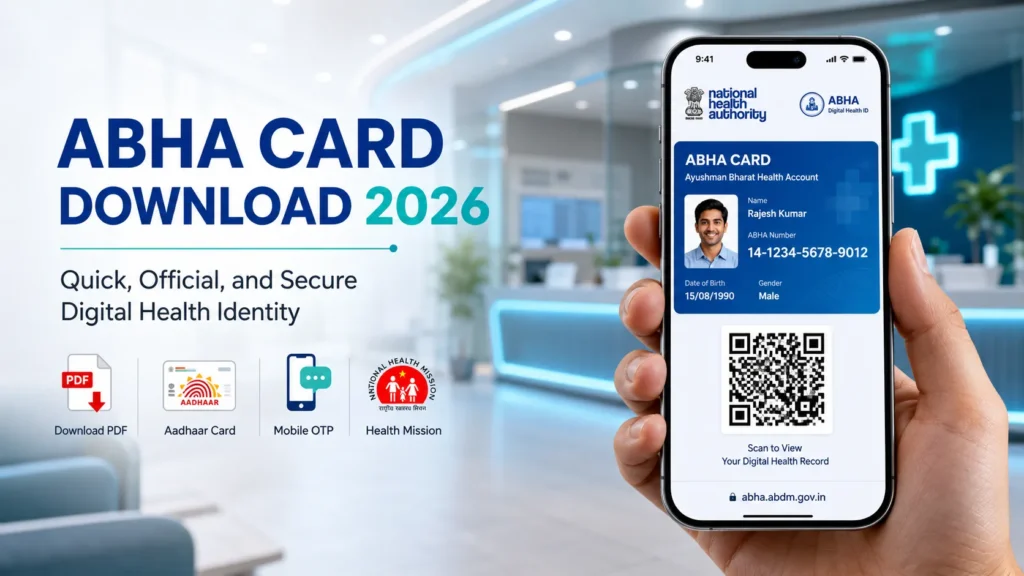
ABHA Card Download Methods Which One Should You Use
Download abha card is possible through five different methods. Choose the one that best fits your situation:
| Method | What You Need | Speed | Best For |
|---|---|---|---|
| Official Website (Aadhaar OTP) | Aadhaar number + linked mobile | Fastest | Everyone — recommended |
| Official Website (ABHA Number) | 14-digit ABHA number + password | Fast | When Aadhaar mobile unavailable |
| Download by Mobile Number | Registered mobile number + OTP | Fast | Quick access backup |
| ABHA App | App installed + login | Instant | Mobile users — card stays in app |
| DigiLocker | DigiLocker account + Aadhaar | Moderate | Long-term safe storage |
Abha card download via the website gives you a PDF file to save on your device. The ABHA app keeps the card available inside the app including QR code even without internet after the first login.
How to Download ABHA Card PDF from Official Website
Abha card download pdf from the official portal is the primary method. How to download abha card follow these steps exactly:
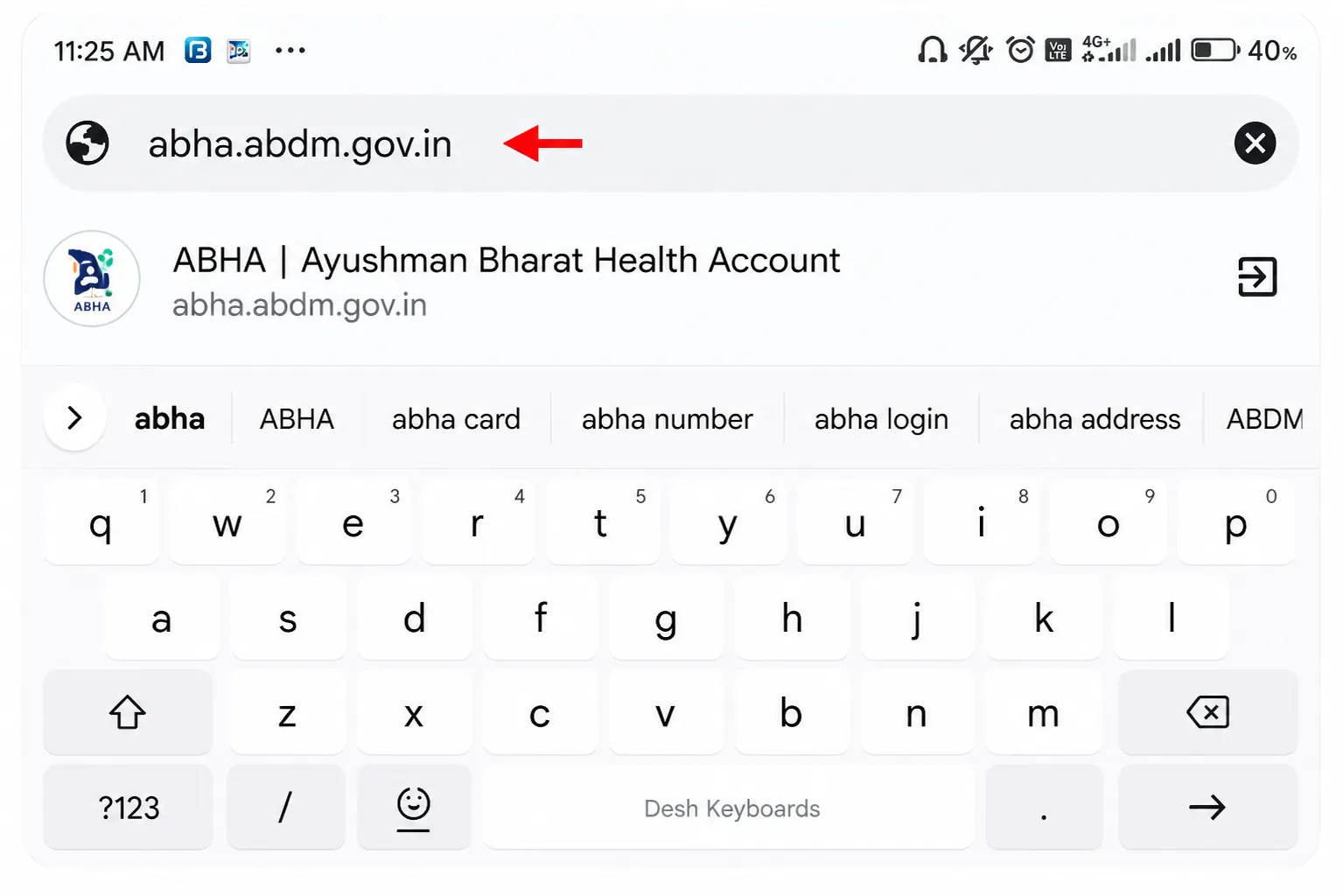
Open the Official Portal
Visit abha.abdm.gov.in.
This is the only authorized portal for abha card download online. The page works on any browser Chrome, Firefox, or Safari on both mobile and desktop.
Click Login
Click the Login button on the homepage.
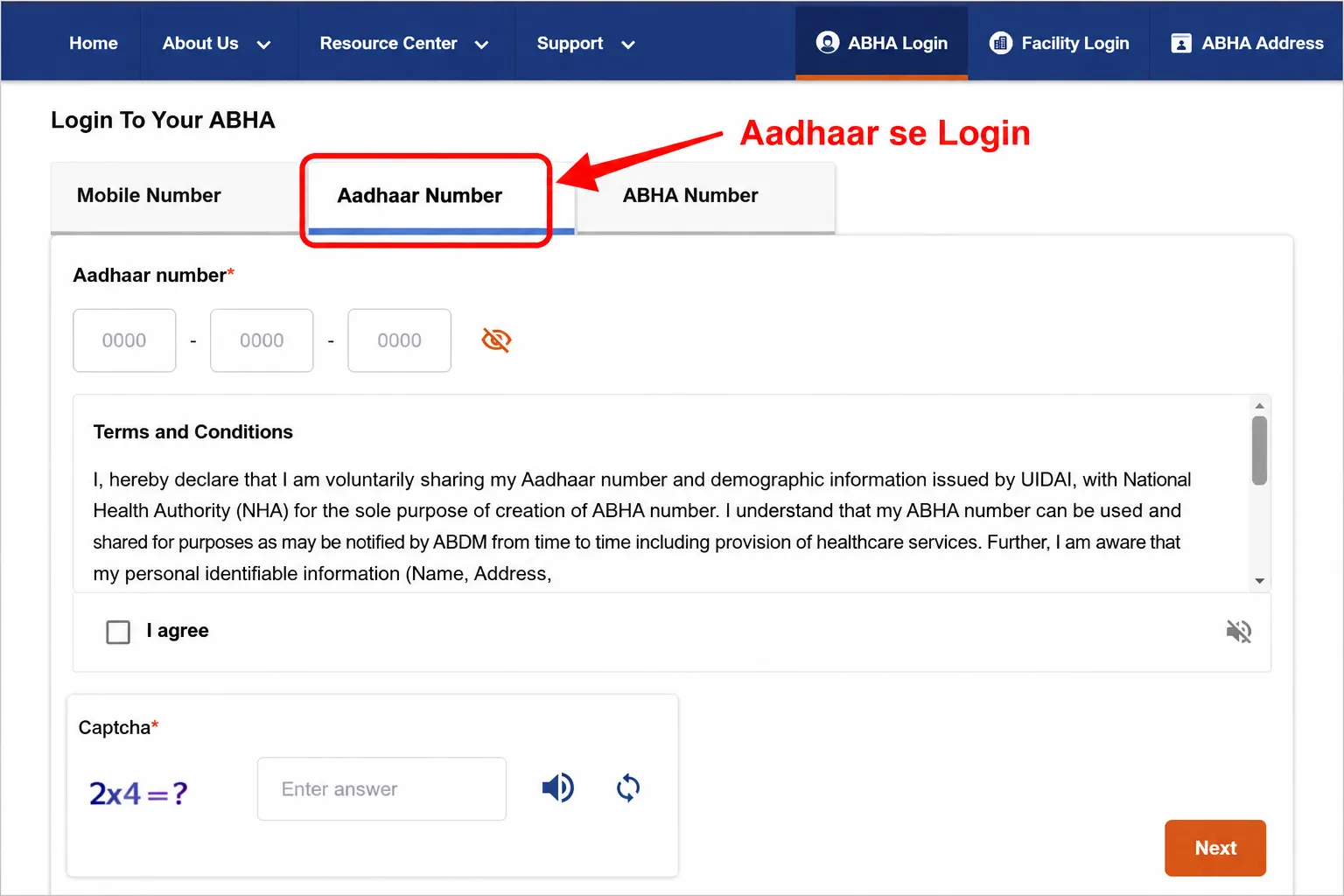
You will see three login options: Aadhaar OTP, ABHA Number, and Mobile OTP.
Choose the one that works for you. Aadhaar OTP is fastest.
Verify Your Identity
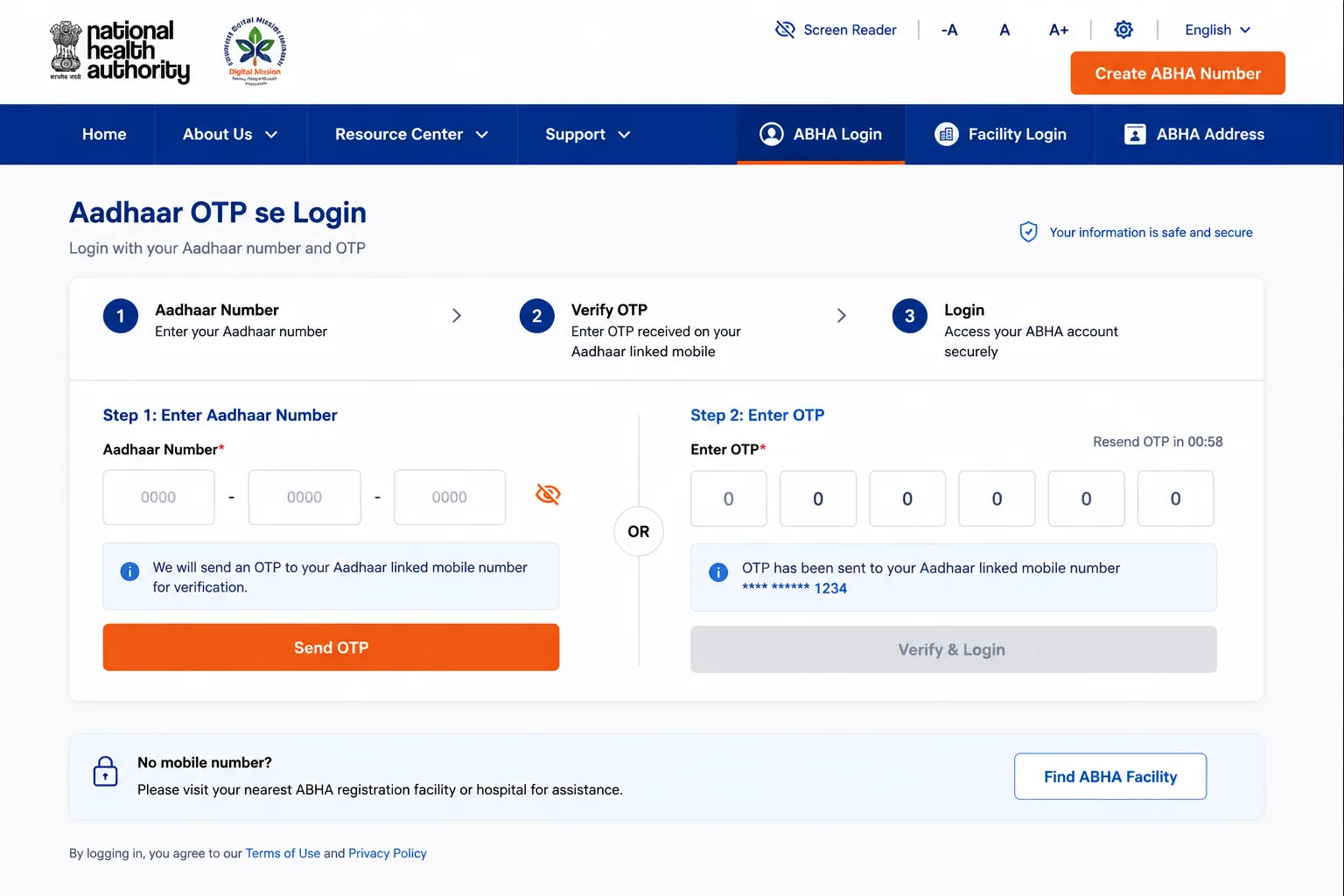
For Aadhaar login: enter your 12-digit Aadhaar number, solve the CAPTCHA, and enter the OTP sent to your Aadhaar-linked mobile.
For abha health card download via ABHA number: enter your 14-digit number and password.
Go to Your Dashboard
After login, your ABHA dashboard opens. You can see your ABHA number, profile details, and linked health records. For download abha card online, look for the ‘Download ABHA Card’ button it is prominently displayed.
Click Download
Click ‘Download ABHA Card‘. The abha card pdf generates and downloads automatically. File size is typically 100-250 KB. The abha card download pdf file saves to your Downloads folder. ABDM Playbook
What Information Is Included in the ABHA Card PDF
Download abha health card and you will find these elements on the card:
| Element on Card | Description | How It's Used |
|---|---|---|
| Your Full Name | As registered in Aadhaar | Identity verification at hospitals |
| 14-digit ABHA Number | Your unique permanent health ID | Primary identifier at all ABDM facilities |
| QR Code | Scannable code containing your ABHA data | Hospital staff scan this for instant record access |
| Date of Birth | From Aadhaar / registration data | Patient identity confirmation |
| Gender | From registration | Medical records categorization |
| ABHA Address | Your health login ID (PHR address) | Digital login across ABDM platforms |
| Issuing Authority | National Health Authority (NHA) logo | Confirms official government ID |
Downloaded but blurry? Open the PDF in Adobe Acrobat Reader or Google Drive for sharper rendering. Phone gallery apps sometimes compress PDF previews.
How to Download ABHA Card Using Aadhaar Number
ABHA card download by Aadhaar number is the most reliable login method for downloading. Here is the exact process:
- Open abdm.gov.in and click Login.
- Select ‘Login with Aadhaar‘.
- Enter your 12-digit Aadhaar number and complete the CAPTCHA.
- An OTP is sent to your Aadhaar-linked mobile. Enter it.
- Your dashboard opens — click ‘Download ABHA Card’.
- ABHA card download by Aadhaar number PDF saved to device.
How to Download ABHA Card Using ABHA Number
Download abha card with abha number use this if your Aadhaar-linked mobile is unavailable:
- abdm.gov.in click Login.
- Select ‘Login with ABHA Number‘.
- Enter your 14-digit ABHA number.
- Enter your password or click ‘Login with OTP’ to receive OTP on registered mobile.
- Dashboard opens click ‘Download ABHA Card’.
- Abha card download by abha number
Abha number card download forgot your ABHA number? Click ‘Forgot ABHA Number’ on the login page. Enter your Aadhaar and OTP to recover it. Then proceed with abha id card download normally.
Do not know your ABHA number? Your ABHA number was shown on-screen immediately after registration. Check your email (if you provided one during registration) or use ‘Forgot ABHA Number’ on the login page.
How to Download ABHA Card Using Mobile Number
Download abha card with mobile number works if your account was created using mobile number or if you simply prefer OTP login:
- abdm.gov.in — click Login.
- Select ‘Login with Mobile Number’.
- Enter your registered mobile number.
- OTP is sent to that mobile. Enter it within 10 minutes.
- Dashboard opens. Click ‘Download ABHA Card’.
- ABHA card download pdf by mobile number PDF saved to Downloads.
How to Download ABHA Card Using the Official App
How to download abha card on mobile using the official ABHA app this is the most convenient method for smartphone users. Abha app download steps:
Step 1: Get the Official ABHA App
- Android: Open Google Play Store, search ‘ABHA’, install the app by NHA
- iPhone: Open App Store, search ‘ABHA’, install the official NHA app
- Critical: Only install the NHA official app. Do not install third-party ‘health card’ apps.
Step 2: Login to the App
- Open the ABHA app and tap Login.
- Choose Aadhaar, ABHA Number, or Mobile OTP.
- Complete OTP verification.
- Your profile and health card load automatically.
Step 3: Access and Share Your Card
- Go to Profile section in the app.
- Tap ‘Download Card’ or ‘Share’.
- Save the PDF or share it via WhatsApp, email, or print.
- Bonus: The QR code is visible in the app even without internet perfect for hospital visits.
App advantage: The ABHA card QR code stays visible offline in the app once you log in. At the hospital, simply open the app and show the QR code screen no PDF needed, no internet required in the hospital.
How to Print ABHA Card and Get a Physical Copy
ABHA card print is straightforward once you have the PDF:
- Download the ABHA card PDF using any method above.
- Open the PDF on your device.
- Press Ctrl+P (Windows/Android) or Cmd+P (Mac/iPhone) to open print dialog.
- Set paper size to A4. Print in color for best QR code quality.
- Laminate the printout for durability hospitals accept printed copies.
Want a professional plastic card? PVC ABHA card ordering is available through the official portal. It is a premium physical card with your ABHA details embedded. Full guide: Abha-PVC-Card
How to Save ABHA Card in DigiLocker
DigiLocker is the Government of India’s official document storage platform. Saving your ABHA card there means you can access it from any device, anytime, even years later.
- Visit digilocker.gov.in and log in (or create a free account using Aadhaar).
- Go to ‘Issued Documents’.
- Search for ‘ABHA’ or ‘Health ID’ in the document search.
- Your ABHA card should appear — it may already be linked.
- If not, link it from your ABHA portal under ‘Settings’ or ‘DigiLocker’
ABHA card download link the direct official link is abha.abdm.gov.in. This is the only authorized link. Do not trust any other link for ABHA card download.
Common ABHA Card Download Errors and Their Fixes
Facing issues with your abha card download? Here are the most common problems and their exact solutions:
| Problem | Root Cause | Exact Solution |
|---|---|---|
| Download button not visible | Account not fully loaded | Scroll down on dashboard. Refresh the page once. On mobile, switch to desktop view in browser settings. |
| PDF not downloading | Browser blocking the download | Disable pop-up blocker. Use Chrome. Clear browser cache. Try incognito mode. |
| OTP not received for login | Mobile issue or DND active | Turn off DND. Check if Aadhaar-linked number is active. Wait 2 minutes and click Resend OTP. |
| Login fails repeatedly | Wrong credentials | Use 'Forgot Password' for ABHA number login. Use 'Forgot ABHA Number' to recover your 14-digit number. |
| Downloaded PDF is blank or corrupt | Incomplete download | Delete the file and download again. Ensure stable internet. Use a laptop for larger downloads. |
| QR code not scanning | Low print quality or screen glare | Increase screen brightness. Print in high quality. Clean the QR code area — no smudges. |
| App card not loading | Outdated app version | Update the ABHA app from Play Store or App Store. Clear app cache and reopen. |
| Card shows wrong name or details | Aadhaar data mismatch | Update Aadhaar details first, then re-download ABHA card after 24–48 hours. |
EXPLORE MORE
Frequently Asked Questions
How to download ABHA card fastest method?
ABHA card download fastest: go to abha.abdm.gov.in, click Login, choose Aadhaar OTP, enter your 12-digit Aadhaar, verify OTP, and click ‘Download ABHA Card’ on the dashboard. The PDF downloads in under 30 seconds. This is the recommended method because Aadhaar login is instant and gives you a fully verified session.
How to download ABHA card PDF without internet later?
ABHA card download pdf requires internet only once. After downloading, save the PDF to your phone’s local storage. Additionally, install the ABHA app your card’s QR code is accessible offline inside the app after the first login. So for hospital visits, you never need internet again.
ABHA card download by Aadhaar number exact steps?
Download abha card with mobile number ke liye: abha.abdm.gov.in par ‘Login with Mobile Number’ choose karein. Registered mobile number enter karein, OTP verify karein, dashboard open hoga, wahan ‘Download ABHA Card’ option milega.
What Should I Do After Downloading the ABHA Card?
After abha card download, do these four things: (1) Save the PDF to your phone’s gallery or a dedicated folder — name it ‘ABHA Card’. (2) Save to DigiLocker for permanent backup. (3) Take a printout to keep in your medical folder. (4) Share your ABHA number at your next hospital visit. Login guide: /abha-card-login/
How to Download ABHA Card with Mobile Number?
Download abha card with mobile number: Open abha.abdm.gov.in, click Login, select ‘Login with Mobile Number’, enter your registered mobile, verify OTP, and click ‘Download ABHA Card’ from the dashboard. This works even if you registered using Aadhaar as long as the same mobile is linked to your account.
Is ABHA Health Card the Same as ABHA Card?
ABHA health card download and ABHA card download are exactly the same thing. ‘ABHA health card’ was the earlier name for what is now called the ABHA card. The downloaded PDF, the portal, and the process are identical. Both names refer to your 14-digit Ayushman Bharat Health Account digital card.
How to download ABHA card on mobile using the app?
How to download abha card on mobile via app: (1) Install the official ABHA app from Play Store or App Store (2) Open and log in using Aadhaar or ABHA number (3) Go to Profile section (4) Tap ‘Download Card’ or ‘Share’. The card saves to your phone. The QR code is also visible directly in the app for hospital scanning — no download needed at the hospital.
Which Is the Official App for ABHA Card?
ABHA app download: The official app is simply called ‘ABHA’ and is developed by NHA (National Health Authority). On Android, search ‘ABHA’ on Google Play Store the developer name should be ‘NHA’. On iPhone, search ‘ABHA’ on App Store. The app icon shows the ABDM logo. Only install this — avoid any other ‘health ID’ apps.
Can I Download ABHA Card Without Registering First?
No. ABHA card download requires an existing ABHA account. If you have not registered yet, you need to create your ABHA account first at abha.abdm.gov.in. Registration takes 2 minutes and is free. Once done, you can immediately download your card. Registration guide: /abha-card-registration/
How Many Times Can You Download an ABHA Card?
ABHA card download has no limit. You can download your card as many times as you want — there is no restriction and no fee per download. Each download generates the same PDF with your current registered details. If you change any profile details, download a fresh copy after 24-48 hours to reflect the updates.
What Format Does the ABHA Card PDF Come In?
Download abha card pdf gives you a PDF file (Portable Document Format). File size is typically 100-250 KB. You can open it in any PDF reader Adobe Acrobat, Google Drive, or phone default reader. The PDF contains your name, 14-digit ABHA number, QR code, date of birth, gender, and ABHA address. You can also take a screenshot of it for quick sharing.
Is ABHA ID Card Download Different from ABHA Card Download?
Abha id card download and ABHA card download are the same. ‘ABHA ID card’ simply refers to your identity card under the ABHA system. There is only one downloadable card the ABHA card PDF from abha.abdm.gov.in. The 14-digit number on it is your ABHA ID, which is why some people call it the ABHA ID card.
Download Your ABHA Card Right Now
ABHA card download is a one-step process that gives you permanent access to your digital health identity. Whether you use the website, mobile number, Aadhaar OTP, or the official app all methods are free, fast, and official.
Download abha card today and keep it in three places: your phone’s storage, DigiLocker, and a physical printout in your medical folder. This ensures you are never without your health ID at any hospital, in any city, in any emergency.
Visit abha.abdm.gov.in now to download your card. Not registered yet? Create your account here first: Abha Card Registration. Explore what you can do with your card: Abha Card Benefits